

I’m writing this guide because I personally went through the panic of seeing money disappear from my account without reaching the other side.
A failed UPI payment…
An ATM that didn’t give cash…
An IMPS transfer that got stuck…
I have faced them all over the last few years.
And the truth is — 99% of the time, your money comes back automatically… if you understand how the banking system works.
This guide is written in simple, real, Indian language — not banking jargon.
I want you to feel confident, calm, and in control whenever a transaction fails.
Let’s begin.
1. What Does “Money Debited But Not Credited” Actually Mean?
When you see “money debited but not credited,” it means:
- Your bank deducted the amount
- The receiver’s bank never received it
- The transaction is stuck somewhere in the middle
- Your money is not lost — it is waiting for reconciliation
This happens with:
- UPI payments (GPay, PhonePe, Paytm)
- ATM withdrawals
- IMPS / NEFT / RTGS
- Debit card / Credit card payments
- Wallet to bank transfers
- Online recharges or bill payments
- E-commerce refunds
People usually panic because the money disappears from their balance immediately.
But banks follow a fixed settlement process, and failed transactions are automatically corrected.
In India, RBI rules ensure your money is safe — even if temporarily stuck.
2. Why Does This Problem Happen? (Practical, Real-World Reasons)
If we remove all technical jargon, the main reasons are very simple.
1. Network Failure
Your internet or the receiver’s internet disconnects during the transaction.
2. Server Timeout
Bank servers, UPI servers, or ATM servers may freeze or delay.
3. UPI Server Down (Very Common)
NPCI or the specific app (GPay/PhonePe) may experience overload.
4. ATM Machine Malfunction
Cash jams, low cash, dispenser issues.
5. Bank Downtime
Most banks do maintenance between 11:30 PM and 3 AM.
6. Receiver Bank Not Responding
The beneficiary’s bank may take extra time to update the transaction.
7. Peak Transaction Load
Salary days, festival days, weekends, end-of-month.
8. Technical Glitch Inside the Banking System
Sometimes two banks don’t communicate perfectly within the time limit.
Important:
These issues don’t mean fraud, scam, or loss — they are simply system delays.
3. Immediate Steps to Take When Money Is Debited But Not Credited (Fast Checklist)
Whenever you face this situation, follow these steps immediately.
These are based on my own experiences and what actually works.
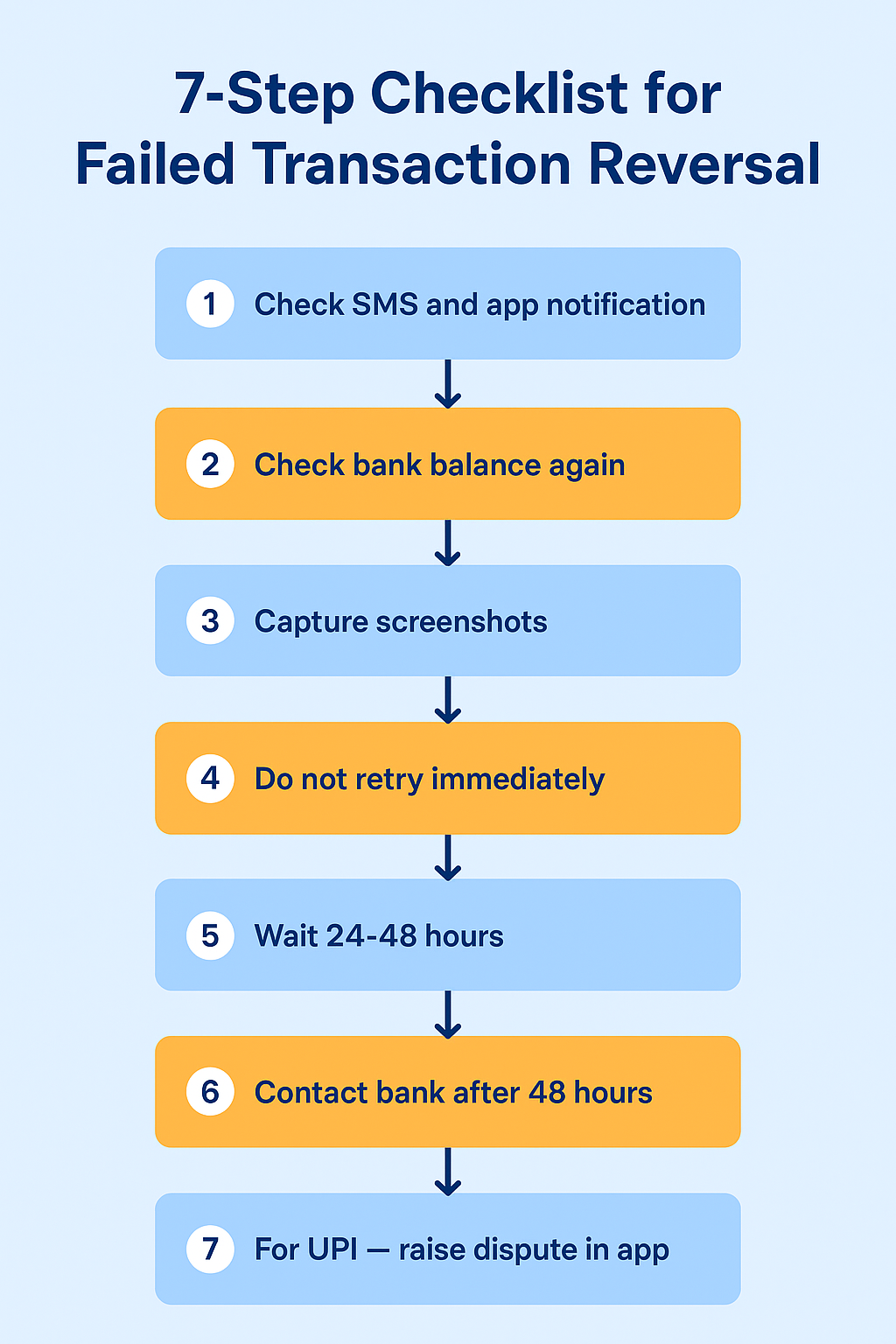
✔ Step 1: Check SMS + App Notification
You need to confirm two things:
- Amount was actually debited
- Transaction ID (UTR / Reference No.)
This is your proof.
✔ Step 2: Check Your Bank Balance After 2–3 Minutes
Sometimes the app shows “debited,” but the backend system hasn’t updated.
Refreshing helps.
✔ Step 3: Take Screenshots
People skip this — and later regret it.
Take screenshots of:
- Transaction page
- Error message
- Bank statement
- SMS alert
This is evidence if you need to complain.
✔ Step 4: Do NOT Retry the Transaction Immediately
If servers are down, retrying can lead to multiple debits.
✔ Step 5: Wait 24–72 Hours
Most reversals happen automatically within a few hours.
UPI: Usually within minutes
ATM: Same day or next day
IMPS: Same day
NEFT: Within 2 hours
Card Payments: 2–5 days
✔ Step 6: Contact Bank If Not Reversed After 48 Hours
Call customer care or visit the branch.
Keep ready:
- UTR
- Amount
- Date & Time
- Screenshots
✔ Step 7: For UPI Payments — Raise In-App Dispute
Google Pay, PhonePe, Paytm all have “Dispute” or “Raise Issue” options.
This speeds up the investigation.
4. RBI Timelines for ‘Money Debited But Not Credited’ (2025 Updated)
This is the most important section for solving payment issues confidently.
RBI has fixed timelines for every type of failed transaction.
| Transaction Type | Auto-Reversal Time (RBI 2025 Rule) | Contact First |
|---|---|---|
| UPI Payment Failed | Within 5 working days | Your bank (account debited) |
| ATM Cash Not Dispensed | Within 5 calendar days | ATM-owning bank |
| IMPS Failed | T+1 day | Your bank |
| NEFT Failed | Within 2 hours | Your bank |
| RTGS Failed | Within 30 minutes | Your bank |
| Debit/Credit Card Failure | 5–7 days | Card-issuing bank |
| E-commerce Refunds | 2–7 working days | Merchant |
| Wallet-to-Bank Failed | Within 4 hours | Wallet provider |
Key Points You Must Remember
- Your own bank is responsible for UPI, IMPS, NEFT, RTGS failures.
- The ATM-owning bank is responsible for non-dispensed cash.
- E-commerce refunds depend on merchants (Amazon, Flipkart).
- If deadlines are crossed → you are entitled to compensation.
5. UPI Payment Failed? Money Debited But Not Credited (Google Pay, PhonePe, Paytm)
This is the most common problem in India.
Here is the most complete, practical guide you will ever need.
Why UPI Payments Fail (Easy Explanation)
- NPCI network congestion
- Bank server down (sender or receiver)
- Slow internet
- Maintenance window
- App freeze
- Receiver’s bank not responding
Step-by-Step What You Should Do
🟢 Step 1: Check Status in Two Places
- Your UPI app
- Your bank app / net banking
The bank’s app shows the real truth.
Sometimes UPI apps show “processing” even after reversal.
🟢 Step 2: Note Down The UTR Number
This is your “transaction tracking number.”
Always save it.
🟢 Step 3: Raise a Dispute Inside Your UPI App
- Google Pay: Help → Contact us
- PhonePe: Select Transaction → Raise Dispute
- Paytm: 24×7 Help → Payment Issue
This creates an automatic ticket.
🟢 Step 4: Wait for 72 Hours
Most UPI reversals happen within:
- 2 minutes
- 30 minutes
- 24 hours
- Max 3 working days
🟢 Step 5: Not Reversed? Contact Your Bank
Your bank can check NPCI logs and see exactly:
- Whether money left your bank
- Whether it reached receiver bank
- Whether reversal is stuck
In most cases, bank support solves UPI issues faster than apps.
What NOT To Do (Very Important)
❌ Don’t keep retrying
❌ Don’t ask receiver to follow up
❌ Don’t panic — money is always traceable
6. ATM Cash Not Received But Amount Debited (Most Common Offline Issue)
This is a situation everyone fears. I have personally experienced it twice.
Why Does ATM Cash Not Come Out?
- Low cash
- Jammed dispenser
- Power failure
- Machine timeout
- Out-of-service ATM
- Bank server down
What You Should Do Immediately
✔ Step 1: Take Photo or Keep ATM Slip
If no slip printed → take a photo of the screen.
✔ Step 2: Check SMS for Debit
This proves money was deducted.
✔ Step 3: Raise ATM Complaint
You can complain through:
- Mobile banking app
- Internet banking
- ATM helpline number
- Bank branch
✔ Step 4: RBI Rule
Reversal must happen within:
⏳ 5 calendar days
Beyond this → bank must pay ₹100 per day as compensation.
7. Online Bank Transfer Issues (IMPS, NEFT, RTGS): Money Debited But Not Credited
These are common when transferring urgently.
IMPS Failed
Reversal timeline:
- T+1 day (Next working day)
Usually reversed within hours.
NEFT Failed
Reversal timeline:
- Within 2 hours
If not, contact your home branch.
RTGS Failed
Reversal timeline:
- Within 30 minutes
RTGS works in continuous batches — rarely gets stuck.
If banks delay → file RBI complaint (explained later).
10. Why Banks Sometimes Delay Reversals (Actual Internal Reasons)
Banks never openly admit these reasons, but here is the truth based on real customer experiences and internal banking process details:
1. Payment Gateway Lag
Sometimes the payment gateway sends a “payment failed” signal late, while the bank already debited the amount. Banks wait for backend reconciliation before refunding.
2. NPCI Network Congestion (UPI Based)
UPI payments sometimes get stuck due to heavy load. If NPCI doesn’t confirm the final status instantly, banks delay the update.
3. Manual Batch Settlement
Many banks settle failed transactions in batches at night.
If the transaction fails during the daytime, refund gets queued for the next settlement run.
4. Inter-Bank Communication Delay
If sender and receiver banks are different, a mismatch or timeout causes delays.
5. Anti-Fraud Protocols
If the bank system flags a transaction as “suspicious”, it is held temporarily.
6. ATM Cash Dispenser Issues
ATM machines may get stuck or jammed during dispensing, making the system show “cash dispensed” even if it didn’t.
7. Server Synchronization Gaps
Banks maintain multiple servers — core banking, mobile banking, ATM switch, UPI switch.
Mismatch = delay.
8. Weekends / Bank Holidays
Refunds may take 1–2 extra days on long holidays.
11. When Should You File a Police Complaint? (Only 3 Situations)
Filing an FIR is NOT needed for normal failed transactions.
But you must take action if any of the following happens:
✔ 1. Money Debited & Suspicious Account Received Money
If your money went to an unknown person’s bank account and the bank refuses reversal.
✔ 2. Fraud Using Your Card / UPI ID
Unknown or unauthorized debit transactions.
✔ 3. Multiple Failed Attempts & Large Amount Debited
If the bank is not cooperating even after TAT completion.
Required Documents for FIR
- Bank statement
- Transaction ID
- SMS alert proof
- Screenshot of the app/ATM message
- Complaint letter
Police will register:
- Cyber Complaint (National Cyber Crime Portal)
- FIR for unauthorized debits
12. Exact Legal Rights Under RBI Rules You Must Know
To make banks take your complaint seriously, use these exact RBI rules:
📌 RBI Circular on “Customer Protection – Unauthorized Electronic Banking Transactions”
This rule gives you:
- Zero Liability
- Limited Liability
- Timely refund rights
📌 RBI Turn Around Time (TAT) on Failed Transactions
Every bank must reverse money within:
- UPI / Wallet / IMPS / Failed Payment: 1–3 days
- ATM No Cash Issue: 5 days
- POS/Online Debit Failed: 7 days
📌 RBI Penalty Rule
If the bank delays refund beyond TAT:
- Bank must pay ₹100/day penalty.
📌 RBI Ombudsman Right
If bank denies or delays:
- You can complain to RBI Ombudsman (free)
- Bank must reply in 30 days
- Compensation ₹10,000–₹1,00,000 possible
13. Sample Complaint Letter to Bank (Copy-Paste Format)
You can use the below format exactly as it is:
To
The Branch Manager
[Bank Name]
[Branch]
Subject: Request for Refund – Money Debited but Not Credited
Dear Sir/Madam,
I am writing to inform you that on [date], an amount of ₹[amount] was debited from my [account/UPI] but the beneficiary has not received the amount.
Transaction Details:
- Transaction ID: [ID]
- Mode: (UPI / ATM / NetBanking / Card)
- Time: [time]
- Amount: [amount]
Please resolve the issue at the earliest as per RBI TAT rules for failed transactions.
I request you to refund the amount or provide confirmation of credit.
Thanking you,
[Your Name]
[Mobile Number]
[Address]
14. Ready-Made Email Format to Customer Support (Simple & Short)
Subject: Money Debited but Not Credited – Urgent Refund Required
Dear Team,
My money was debited on [date/time], but the transaction failed.
Please initiate a reversal.
Transaction ID: [ID]
Amount: ₹[amount]
Thanks,
[Your Name]
15. If You Used GPay / PhonePe / Paytm – Do This Immediately
UPI apps have an internal process that is faster than bank complaints.
On GPay
- Open transaction
- Tap “Raise Dispute”
- Select: Money debited but not received
- GPay sends request to NPCI + Bank
- Refund normally comes in 1–2 hours
On PhonePe
- Open transaction
- Tap “Help”
- Choose “Money debited but payment failed”
- Submit automatically
On Paytm
- Go to Help & Support
- Select Failed Transaction
- Refund auto-initiates
16. “Money Debited but Not Credited” – Refund Time Chart (Simple Table)
| Payment Type | When Refund Comes | TAT (Max Days) |
|---|---|---|
| UPI Payment | 1–3 hours | 1 day |
| IMPS | 1–4 hours | 1 day |
| NetBanking | 1–2 days | 3 days |
| ATM Cash Not Received | 24–48 hours | 5 days |
| POS / Swipe | 2–3 days | 7 days |
| Wallet | Instant – 48 hours | 2 days |
17. How to Track Refund Status (Step-by-Step)
Method 1 – Bank SMS Alerts
You will receive:
“Reversal of ₹XXXX for Txn ID XXXX is credited.”
Method 2 – UPI App History
Shows:
- “Reversal”
- “Auto-refund”
Method 3 – Bank Mini Statement
Check for:
- REVERSAL
- UPI REV
- FAILED REV
Method 4 – Customer Support Call
Tell them:
“Please check the status under ‘Pending Reversal Queue’.”
18. When to Escalate the Issue? (Timeline Guide)
- After 24 hours: Raise complaint
- After 2 days: Call customer care
- After 5 days: Email Nodal Officer
- After 7 days: Send written letter
- After 15 days: Escalate to Head Office
- After 30 days: File RBI Ombudsman Complaint
19. RBI Ombudsman Complaint – Complete Guide
If the bank doesn’t respond in 30 days, follow this:
Steps:
- Visit RBI CMS Portal
- Choose “Digital payment failure”
- Upload files
- Submit complaint
- RBI assigns a case officer
- Bank must reply with proof
You can claim:
- Refund
- Delay compensation
- Mental harassment compensation
- Extra charges refund
20. FAQ Section
Why is my money deducted but payment failed?
This usually happens due to:
Slow internet
Bank server down
UPI/NPCI congestion
Timeout during transaction
Receiver’s bank not responding
ATM machine error (for cash withdrawals)
Your money is not lost — it is just stuck in the settlement process and will be automatically reversed as per RBI rules.
How long does UPI reversal take?
UPI reversals usually happen:
Within a few minutes, or
Within 30 minutes, or
Within 24 hours, and
Maximum 3 working days (as per NPCI & RBI timelines)
If the money is not reversed within 72 hours, contact your ban
What if ATM cash is not received but money is debited?
Note the ATM location, time, and reference number
Take a photo of the screen (if possible)
Check SMS/bank balance
Raise an ATM dispute through: Mobile banking
Net banking
Bank branch
ATM helpline
RBI Rule:
Refund must come within 5 calendar days.
If delayed → bank must pay ₹100/day compensation.
What is the RBI rule for failed transactions?
RBI has fixed TAT (Turn Around Time) rules:
UPI/IMPS/Wallet: Refund within 1–3 days
NEFT: Within 2 hours
RTGS: Within 30 minutes
ATM no cash: Within 5 days
Card payment failure: Within 7 days
If banks delay beyond this, you are eligible for ₹100/day penalty.
Will my money come back automatically?
Yes.
In 90% of cases, the amount returns automatically because:
RBI mandates auto-reversal
Banks settle failed transactions in batches
NPCI pushes refunds in UPI cases
If the refund doesn’t come within the TAT period, raise a complaint.
21. Final Conclusion
If your money debited but not credited, don’t panic—RBI rules completely protect you.
In 90% cases, the refund comes automatically within 24 hours.
In rare cases, the bank may delay, but you have complete rights to:
✔ Raise complaint
✔ Ask for reversal
✔ Claim ₹100/day penalty
✔ Escalate to RBI Ombudsman
Just follow the steps in this guide, and you will definitely get your money back.
ATM Cash Not Received but Amount Deducted: Complete Step-By-Step Solution (2025 Guide)